Modules on MONTAGE
You know, there is a high chance that whatever software you are using, somebody else is using too. Instead of each one of you having individual installations, it saves more space (and my energy), if users can access these softwares as a shared resource.
Introducing modules! Just type in:
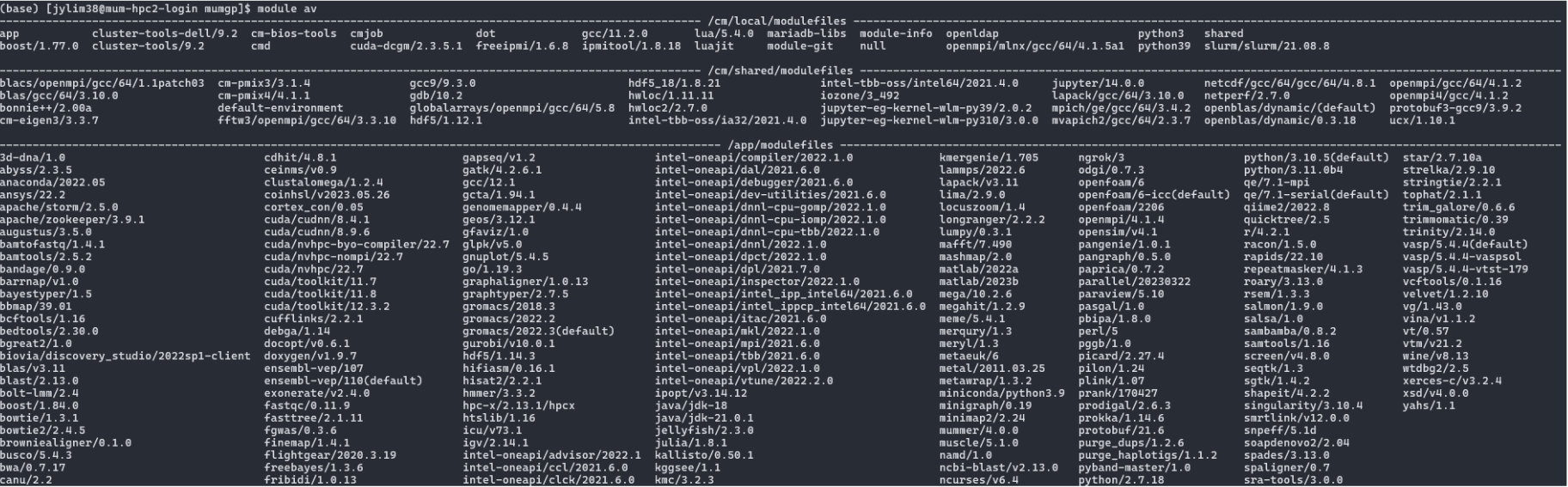
module av
You will be presented with a list of loads of softwares.
Just drop us a software install request at iLab
You figured the list contain a software that you want to use? Say I am interested in a software named parallel, go ahead in the login node, just type in:
module load parallel
module load all the softwares in one goThere are reasons these softwares are not all loaded by default. Just load what you need.
If you go through the module av list, you should notice that there are different versions of the same software. You should now notice, that these softwares will not work if they are all loaded. Like, which one you want? Is it cuda/cudnn/8.4.1 or cuda/cudnn/8.9.6.
Prepare your slurm script for the job submission, then add the module load line:
module load parallel
module load cuda/cudnn/8.9.6
If you don't need a software that you don't need anymore:
module unload parallel
Say throughout your workflow:
-
There are a bunch of softwares that you will need.
-
Different softwares at each step.
-
Say in my workflow:
- There are three steps
- Each step will require, say three different softwares from the modules list.
- Instead of putting in 9 lines of
module load, just load the three softwares relevant to each individual steps. That means, three separate slurm scripts for the three separate steps.
step1_genomeAssembly.slurmmodule load abyss/2.3.5
module load canu/2.2
module load metawrap/1.3.2
# ...
# the rest of the code for step1
# ...step2_readAlignment.slurmmodule load bowtie2
module load bbmap/39.01
module load stringtie/2.2.1
# ...
# the rest of the code for step1
# ...step3_functionalAnnotation.slurmmodule load hmmer/3.3.2
module load roary/3.13.0
module load repeatmasker/4.1.3
# ...
# the rest of the code for step1
# ...
Keep in mind, when you load a software module, it comes with the dependencies. Say prior to loading any module, you have python 3.12, with packages like pandas. When you load a software module (like medaka), that module comes with its own python version and dependencies, and that was how I was caught red-handed not realizing that pandas was not available, because it wasn't the same python that I meant to use.
In that case, just module unload medaka should solve the problem.